On 29 September 2026 OpenAI announced dots: always-on agents, each with its own cloud computer, running on GPT‑6 Astra, connected to more than four thousand apps through a plugin ecosystem, and reachable in ChatGPT, Slack and Teams.
The capability description will be familiar to anyone who has followed the field over the past year. The part discussed less — and the part we think genuinely matters to a company — sits in the accompanying safety write-up: the rules defining what an agent may do without asking, and what it must always ask about.
What dots are, briefly
- Always-on agents that keep working between conversations rather than ending with a session.
- Each agent has its own cloud computer and browser; you can open it and follow the work.
- They connect to apps you have authorised, and you may also let them use your own computer.
- When you are not working with it, an agent can run background “proactive research” to look for ways to help.
- Available on Pro and Business Premium, and in beta for Enterprise once an admin enables it.
Four action tiers
Rather than leaving the model to weigh each situation, OpenAI sorts actions into four tiers in advance. Custom Rules can tighten any of them, but none can be loosened: per the documentation, a user's approval cannot override core safety requirements.
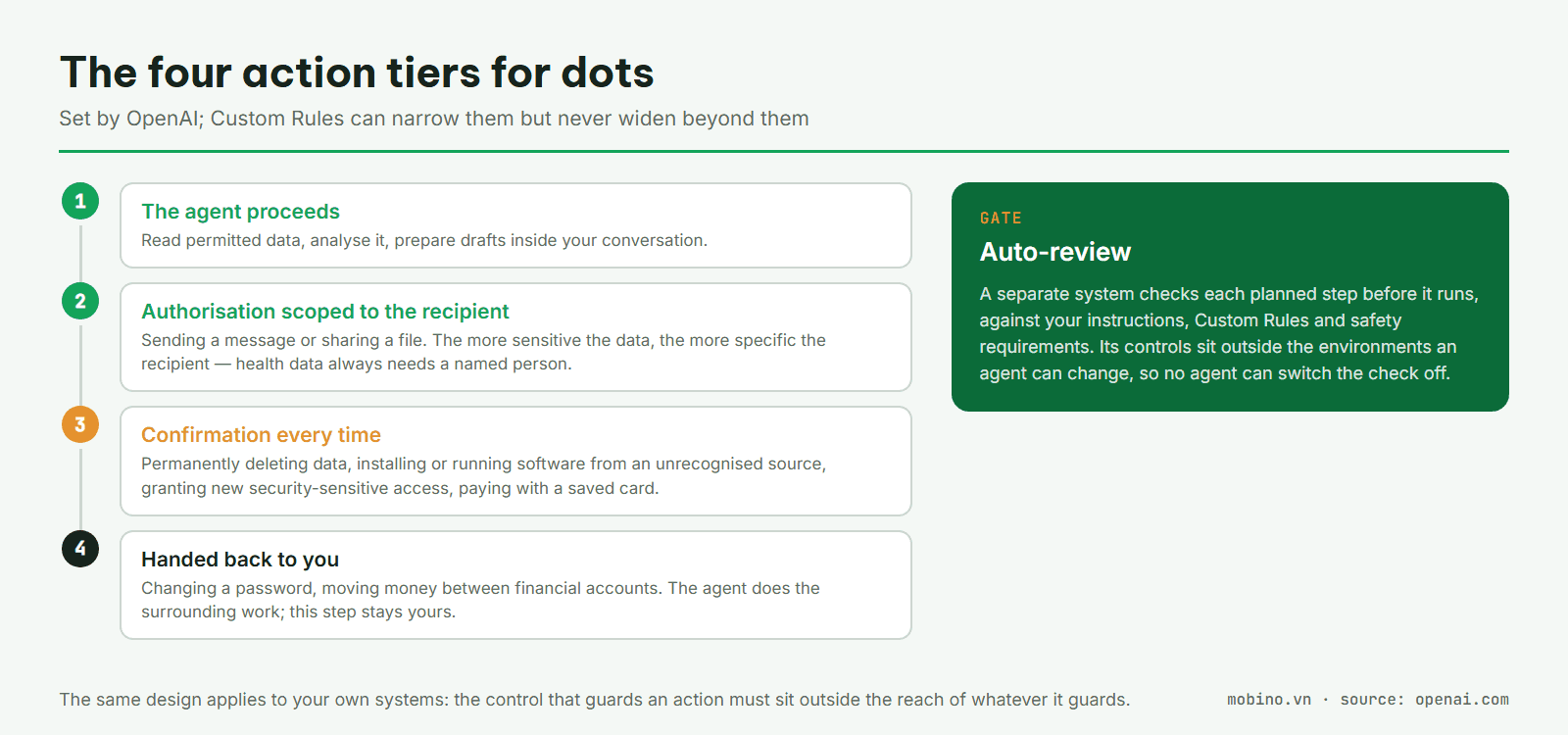
The most interesting detail is in the second tier. Permission to send a message or share a file is scoped to the recipient, and the sensitivity of the data decides how specific that has to be. Health data always requires a named recipient, while a phone number or email address only needs a class of recipient by default.
That authorisation is tied to the instructions for that one task, and it does not widen when the agent continues the work later or delegates it to another agent.
Auto-review: a gate outside the reach of what it guards
Before a step with real consequences runs, a separate system called Auto-review checks it against the user's instructions, the Custom Rules and the safety requirements.
If the action is blocked, the system returns the reason so the agent can decide what to do next: ask for more information, try a permitted alternative, hand the step back to the user, or stop.
The design point worth learning from is not the check itself but where the control sits. OpenAI states that the controls enforcing Auto-review are outside the environments an agent can change, so no agent can switch off its own check.
This is the same principle we keep returning to when we say that business logic and control belong outside the model vendor's tooling: whatever guards an action must sit beyond the reach of the thing being guarded.
Proactive research follows the same shape. Background tasks may use tools in read-only mode only, and that limit is enforced in code: they cannot send messages, change content in connected apps, or drive a browser or a desktop.
To act on what it finds, the agent has to come back through the four tiers above. An agent that runs all day with read access only is a sound design — and a default worth copying inside your own systems.
Specialist dots: a new principal in your access model
The enterprise section is where the approach really changes.
OpenAI introduces specialist dots: agents a company builds for defined responsibilities. What matters is that each one is given its own identity, credentials and access rights to the systems it needs.
OpenAI says it has been testing the pattern internally across procurement, invoice processing, email marketing, customer support and commercial contracting, and is working with Microsoft to govern specialist dots through Agent 365.
An agent holding its own account in your ERP or CRM is no longer simply an AI feature. It becomes a new principal in your access model, and has to be governed as an independent one.
That Microsoft is building agent governance into Agent 365 also shows that the vendors themselves read this as an identity and access management problem rather than an AI model problem. The question is shifting from “how smart is the agent?” to “what is the agent allowed to do?”.
Three questions to answer before granting any agent an account in a real system:
- What may it read, and who approves that scope?
- Where may it write, and can the target system record that this agent made the change?
- Who can revoke the access, how quickly, and what happens to work in progress?
If a system cannot answer the second question, it is not ready for an agent to write into. An audit trail is not only a demand from your auditor; it is the basis for reconstructing exactly what happened when something goes wrong.
What the announcement does not answer
- Availability is still narrow: Pro in markets outside the European Economic Area, Switzerland and the UK; Business Premium across supported ChatGPT regions; Enterprise in beta and off by default until an admin turns it on.
- Pricing beyond the included allowance is unannounced; each plan carries an allowance, and buying more is described as a future plan.
- Specialist dots are in selective pilots with a handful of organisations, not general release.
- Prompt injection is named plainly as a risk and handled in layers, but the documentation does not claim it is fully solved.
- OpenAI repeats that agents can still make mistakes and that consequential actions need review.
For companies in Vietnam
What to do now is not necessarily to buy an agent, but to prepare the place an agent will occupy in your systems.
Start by listing the processes where a machine-written draft, approved by a person, is already worth something: first-line support replies, document reconciliation, tender paperwork, customer file summaries.
These fit the lower permission tiers, where an agent can help substantially while consequential actions stay under human control. Which usually makes them the right group to deploy first.
In parallel, review the two things no AI vendor can supply for you: first, whether your core systems can record who changed what; second, how you grant and revoke access for a principal that is not a person.
On the connection side, MCP is settling into a standard layer, so lock-in risk at the integration tier may be lower than it used to be. But access rights, scope of action and accountability remain yours.
And that may be the most worthwhile thing to take from dots: once agents have their own computer, account and access rights, the important problem is no longer only how to make AI do more. It is how to make AI do only what it is permitted to do.
If you are designing flows like these, see our Automation and AI page.
Sources: OpenAI — Introducing dots · How we build safety, security, and privacy into dots · Getting started with your dot