MaiStudio is a desktop application built by Mobino that lets Mendix developers work with an AI agent such as Claude Code or Codex in a single window. It concentrates on three things: seeing the model visually, reviewing the agent's changes, and controlling the runtime through a UI. MaiStudio complements Mendix Studio Pro and mxcli.
One principle holds throughout: MaiStudio never writes to the model directly. The agent edits the model through mxcli in its own workspace; only results a person has approved are applied to the target project.
When one change needs several tools
Working on Mendix with AI usually means moving between several windows: Claude Code to assign the work, Studio Pro to look at the model, an editor to change SCSS, then a Java development tool for Java actions.
Switching windows is only part of the friction. When an agent and a developer work on the same project, they also have to avoid overwriting each other. A reviewer needs to know what the agent changed, how the checks came out, and whether the change respects the project's rules. An agent answering “done” is not enough to confirm the work meets the requirement.
MaiStudio brings observing, checking and approving the result into one place.
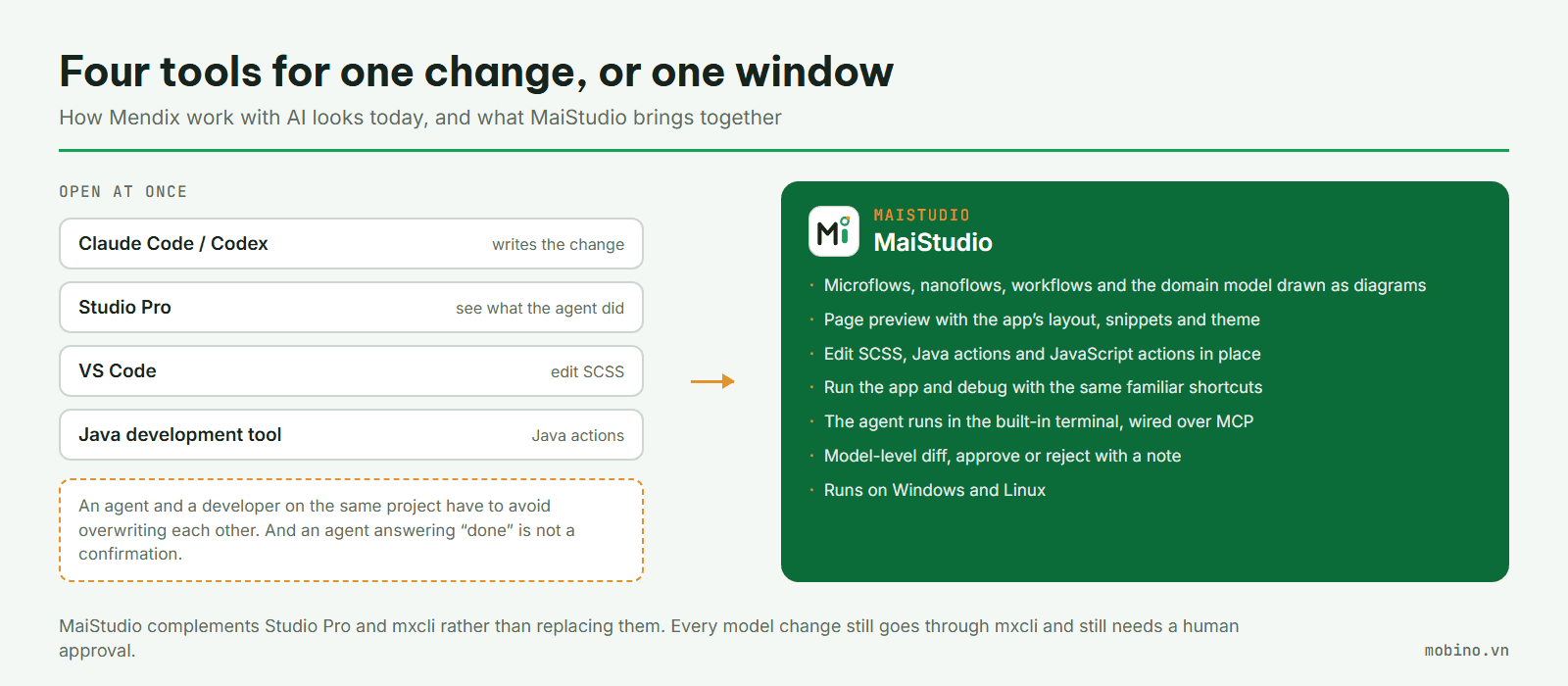
The model and the code in one workspace
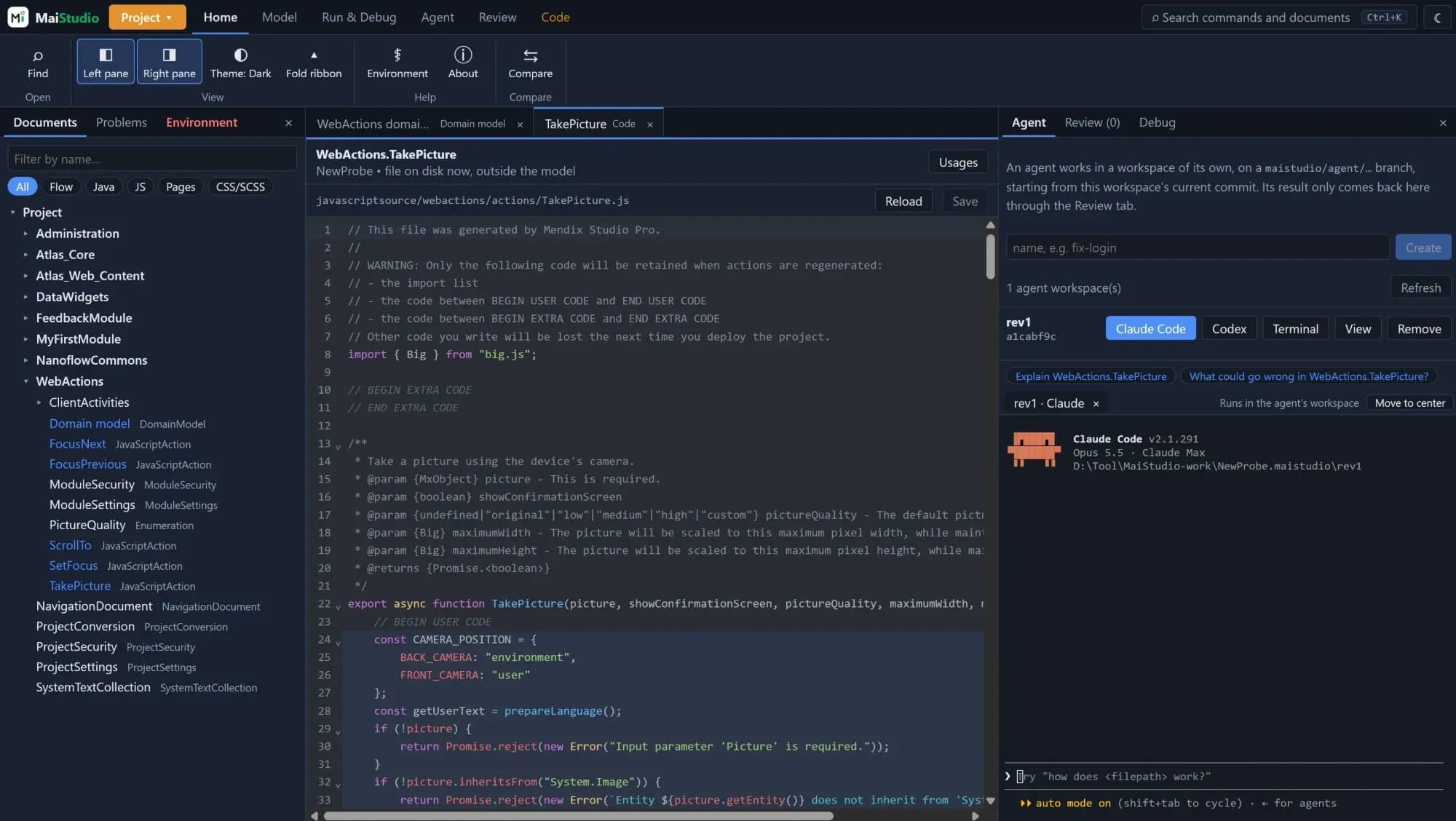
MaiStudio draws microflows, nanoflows, workflows and the domain model as diagrams. A developer can find where a component is used, preview a page with the application's layout, snippets and theme, or compare two versions of the model to see what was added, edited, deleted, and where the flow was rerouted.
The Problems panel collects results from mx check and mxcli lint. When the domain model changes, the database structure statements can be previewed before they run.
On the code side, MaiStudio allows editing SCSS, Java actions and JavaScript actions. The regions Studio Pro preserves when it regenerates a file are marked separately to reduce the risk of editing the wrong part. The application can be run with F5 and flows debugged with the familiar shortcuts.
Each agent gets its own workspace
Claude Code or Codex runs in the built-in terminal and connects to MaiStudio over MCP. From there the agent can read the model, run checks, read logs, set breakpoints and open a document for the user to look at together.
Each agent works in its own workspace and Git branch. A developer can keep their own project open in Studio Pro while the agent works. When an approved result is applied to the target project, MaiStudio re-checks the preconditions and the project's lock state.
The suggestion buttons tied to the open document only fill in the text of a question. The user reviews it and sends it to the agent themselves.
Reviewing changes is the core
The unit being reviewed is a complete change set — the resulting model, the scope of impact, and the evidence from the checks.
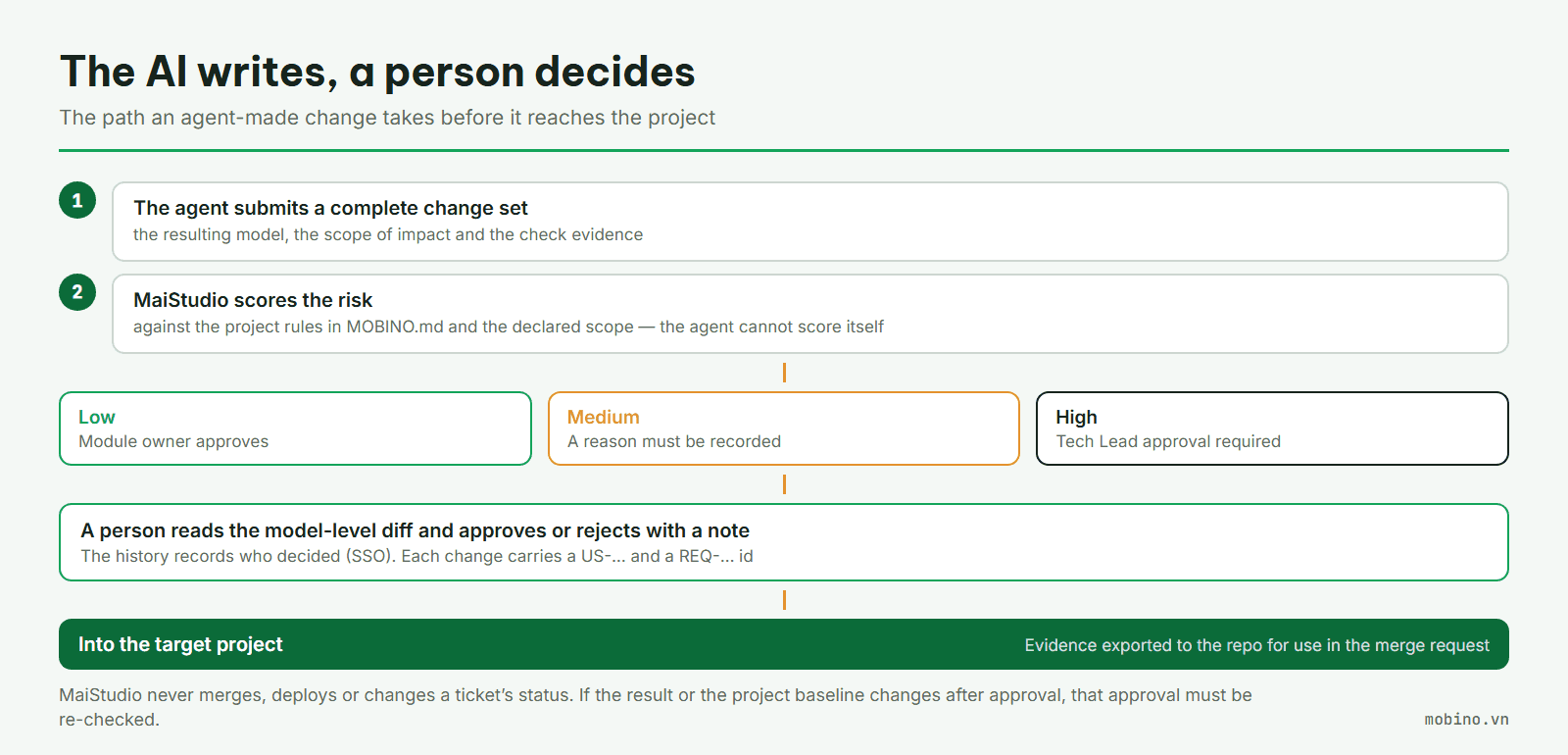
MaiStudio determines the risk level from the project's rules in MOBINO.md. That file describes the shared components and the areas needing tight control, such as authorisation, integrations and migrations. The scope of a change is compared against those rules to set the approval requirement: a module owner handles low-risk changes; medium risk requires a stated reason; high risk requires the Tech Lead.
The reviewer reads the difference at model level, then approves or rejects with a note. The decision is tied to an SSO identity, a work item US-… and a requirement id REQ-…. When the result is applied to the project, the evidence is exported to the repository for use in the merge request.
If the result or the project baseline changes after approval, that approval has to be re-checked. An approval must stay attached to the exact result the person reviewed.
Tied to Mobino's process
Under Mobino's ADLC v3.2 process, the agent reads the project rules and the specification in the repository before doing the work. MaiStudio supports that process but never merges, deploys or changes a ticket's status by itself. Those decisions stay with people.
The application is built with Rust, Tauri and React, runs on both Windows and Linux, and follows the interface conventions of an IDE: a project tree, document tabs, tool panels, a status bar, Ctrl+K search and both light and dark modes.
Linux support was a choice made at the start rather than an addition afterwards. Some of the developers on the team work on Linux, and a tool that runs on a single operating system would force them to change machine or change how they work.
The Environment screen checks how ready the machine and the project are, from the mxcli version through to the agent, the skills and the project rules. Every environment fix asks the user to confirm. Internal updates have their signature verified before installation.
Why Mobino built MaiStudio
Low-code still requires engineering knowledge, testing, and clear accountability for each change. As AI takes a larger part in development, a team needs to see the result and keep the decision.
What Mobino is aiming at is letting a whole team answer three questions: who approved the change, on what evidence, and under which rules?
MaiStudio is currently used internally at Mobino. There is no formal release and it is not available for public download. Code suggestions and Java diagnostics through a language server are still in development.
If your team is bringing AI agents into Mendix projects and would like to talk about controlling changes, get in touch with Mobino.
Mendix and Mendix Studio Pro are trademarks of Mendix Technology B.V. MaiStudio is developed by Mobino; it is not a Mendix product and is not certified by Mendix.